
Net a Fish guide
Net a Fish Nets and Upgrades
Read capacity, width, rarity limits and prerequisites before your next net purchase.
Quick answer
Open Upgrades, compare the next net’s capacity, width and catchable rarity, then confirm the prerequisite and price in your current server.
Net a Fish Nets and Upgrades
Use current in-game values and confirmation text.
Read the net card before buying
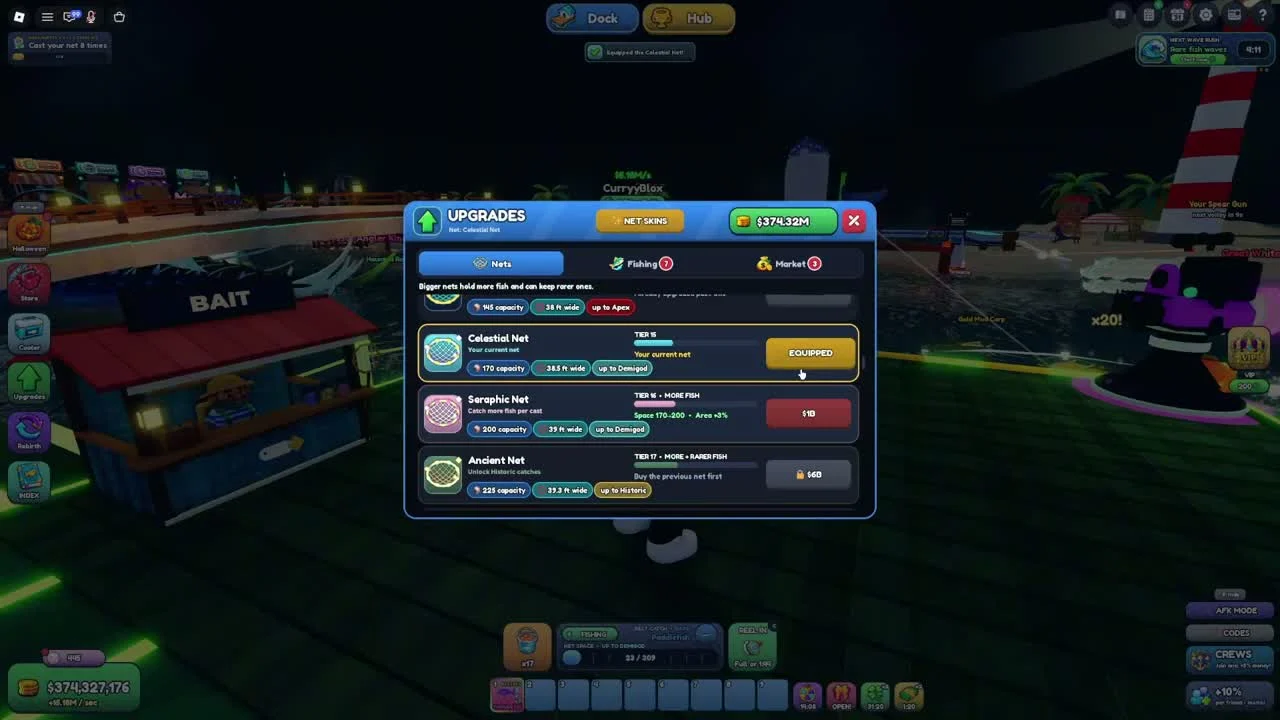
The Upgrades window has Nets, Fishing and Market tabs. In the reviewed Nets tab, each card shows its tier, capacity, width and an up-to rarity limit.
- Success check
- You can compare the equipped net with the next purchase.
- If it remains unclear
- The recorded Celestial Net is equipped, followed by Seraphic Net and Ancient Net. These are examples from that recording, not a complete current tier list or a recommendation to skip directly to a late-game purchase.
Follow the purchase chain
The recorded Ancient Net card says to buy the previous net first. Compare your currently equipped card with the next available purchase and its currency icon.
- Success check
- The required previous net is owned.
- If it remains unclear
- If you have enough cash but a card remains locked, read its prerequisite text. Buying a skin should not be assumed to unlock the next functional net tier; the window has a separate Net Skins control.
Spend against your current bottleneck
A capacity increase helps when the current net fills quickly. A higher rarity cap matters when your net cannot catch the rarities you are targeting. Width describes a separate property shown on the card.
- Success check
- The purchase addresses the limit shown in your current fishing panel.
- If it remains unclear
- Treat this as a decision checklist. The recording does not establish a measured cash-per-minute ranking for all nets, boats, helpers or Fishing upgrades.
Check optional passes independently
The recording opens Roblox’s pass shop and shows Auto Throw, Auto Collect, Big Net, VIP, Extra and Boss Hunter. The creator has some passes marked Owned.
- Success check
- The purchase prompt matches the intended optional benefit.
- If it remains unclear
- Automation and paid bonuses affect the recorded pace. Read the live Roblox purchase prompt and benefit description before buying, and do not use this video’s progression speed as a free-to-play guarantee.
Scope and sources
Official description and reviewed gameplay checked November 4, 2026.
- For Net a Fish by UpdatesDev. Interfaces and balance can change with updates.